
i3D Workbench · Input tool Development builds
Moldify
Parametric generator of safe, 3D-printable food molds — ice, chocolate, cookies and more.
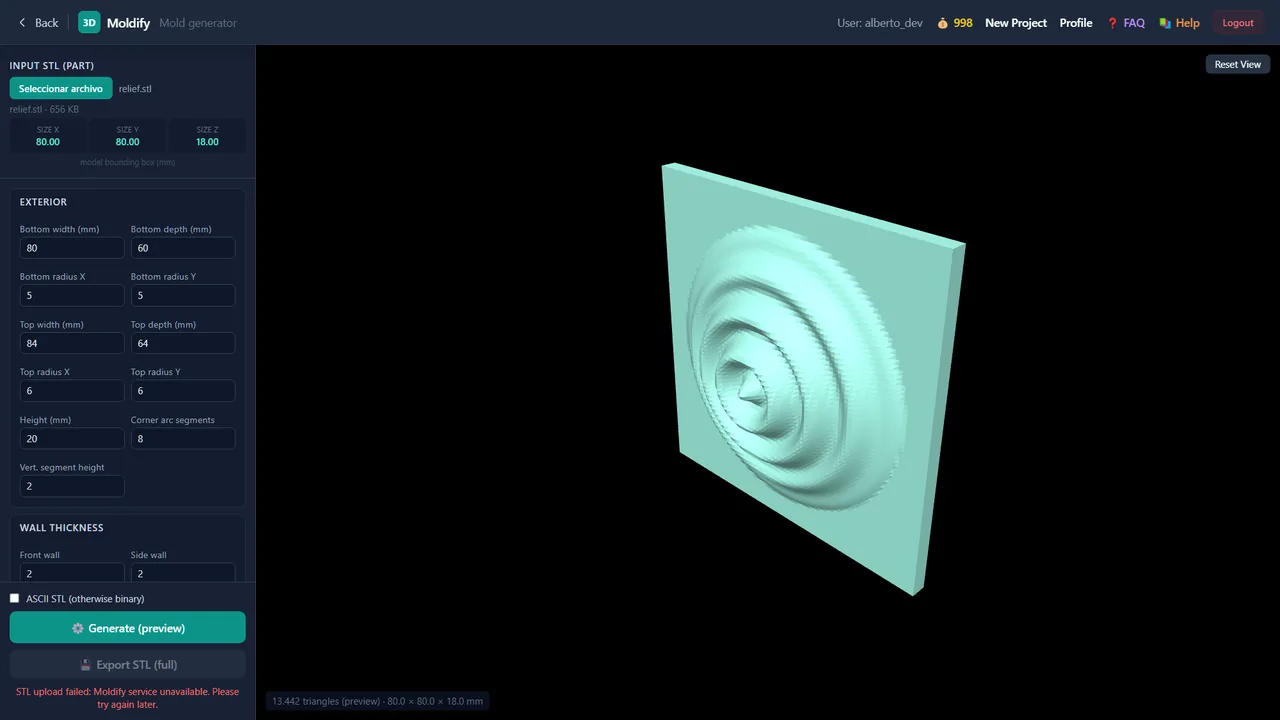
Moldify generates safe, 3D-printable food molds (ice, chocolate, cookies and more) around any part supplied as a binary STL. You set the exterior footprint and draft, wall and base thickness, an optional border ledge, two arrays of fill/push-out holes and an optional lid, preview the mold live, and export it as binary or ASCII STL. It is currently available in development builds.
| Group | Input |
|---|---|
| Status | Development builds |
| Input | STL (binary) |
| Output | STL (binary or ASCII) |
| Max upload | 300 MB per file |
| Runs in | Desktop browser with WebGL 2 (Chrome, Edge, Firefox) — computation on Ahaborg's C++ backend |
| Billing | Pay-per-use credits, no subscription |
| Documented in | i3D Workbench User & Reference Manual v2026.10 |
Overview
Load an input STL (the part to mold) — it is uploaded to the server in the background while you set the mold parameters in the sidebar groups. Click Generate (preview) once to build a quick preview mesh; after that, every parameter change updates the preview automatically (only the parameters are sent, never the STL again). Then Export STL (full) downloads the final mold.
Step by step
- Open Moldify. Click Seleccionar archivo / Open STL and pick the part. Its bounding box (Size X/Y/Z) appears and the upload starts in the background.
- Set the Exterior: bottom and top width/depth, corner radii, height. Make the top slightly larger than the bottom for a draft angle.
- Set Wall thickness (front, side, bottom), an optional Border ledge, hole arrays and a Top cover.
- Click Generate (preview). The preview mold appears; from now on every change re-generates automatically (500 ms debounce).
- When satisfied, tick ASCII STL if your slicer needs it (binary otherwise) and click Export STL (full).
Controls
Input
| Control | Range / values | Default | What it does |
|---|---|---|---|
| Input STL (part) | — | — | Reference part. Moldify wraps a mold cavity around it using the parameters below. Size X/Y/Z shows its bounding box in mm. |
Exterior
| Control | Range / values | Default | What it does |
|---|---|---|---|
| Bottom width / depth (mm) | — | — | Outer footprint of the mold block at the base. |
| Bottom radius X / Y | — | — | Corner radii of the bottom rim. |
| Top width / depth (mm) | — | — | Outer size at the top rim. Larger than the bottom gives a draft/taper for easy release. |
| Top radius X / Y | — | — | Corner radii of the top rim. |
| Height (mm) | — | — | Total mold height. |
| Corner arc segments | — | 8 | Tessellation of the rounded corners (segments per arc). |
| Vert. segment height | — | 2 | Height of each vertical tessellation band. |
Wall thickness
| Control | Range / values | Default | What it does |
|---|---|---|---|
| Front wall / Side wall / Bottom | — | — | Thickness (mm) of each mold wall and the base. Thicker walls are sturdier; thinner walls release and freeze faster. |
Border
| Control | Range / values | Default | What it does |
|---|---|---|---|
| Border ledge / Border height | — | — | Optional flange around the top opening (0 = disabled). Useful for stacking or handling. |
Holes (top) & Holes (bottom)
Two independent rectangular hole arrays (top face and bottom face). For each: hole dimension X/Y, count X/Y (0 = none), spacing X/Y and center offset X/Y. Used for fill/vent holes or push-out openings.
Top cover
| Control | Range / values | Default | What it does |
|---|---|---|---|
| Cover thickness / Top over border bottom | — | — | Optional lid over the cavity and how far it overlaps the border. 0 = open mold. |
Output
| Control | Range / values | Default | What it does |
|---|---|---|---|
| ASCII STL (otherwise binary) | — | off | Export format of the full mold. |
Actions
| Control | Range / values | Default | What it does |
|---|---|---|---|
| Open STL | — | — | Uploads the part to the server once (UploadMoldifySTL); the status line shows the triangle count when done. |
| Generate (preview) | — | — | Builds a fast preview mesh from the current parameters (CreateMoldify); afterwards each parameter change re-runs it automatically. |
| Export STL (full) | — | — | Exports the full-resolution mold (ExportMoldifySTL). |
| Reset View | — | — | Recenters the 3D camera. |
Tips & tricks — Moldify
- Give the mold 1–2° of draft: make the top 2–4 mm larger than the bottom per 20 mm of height. Food molds release far more easily.
- For silicone-like flexibility in rigid prints, use 1.6–2 mm walls (2 perimeters at 0.4 mm); for ice use 2–3 mm so the mold survives thermal shock.
- Add bottom holes the size of a fingertip (12–15 mm) to push the product out; keep them away from the corners.
- Preview is coarse on purpose — judge proportions in the preview, judge surface quality only on the full export.
- Export binary STL unless your slicer refuses it: it is ~5× smaller and loads faster.
- Only parameters travel after the first Generate; if you change the part, open it again so the server receives the new STL.
Troubleshooting
“Moldify service unavailable”.
The C++ backend did not answer. Credits are refunded. Wait a few seconds and press Generate again; if it persists contact support.
Export STL (full) is disabled.
It enables after a successful Generate (preview).
Works well with
Tools that chain with Moldify — see the workflows.