
i3D Workbench · CAM tool Available
OtkMaster
Tangential knife toolpath generator — computes optimized cut paths from SVG contours.
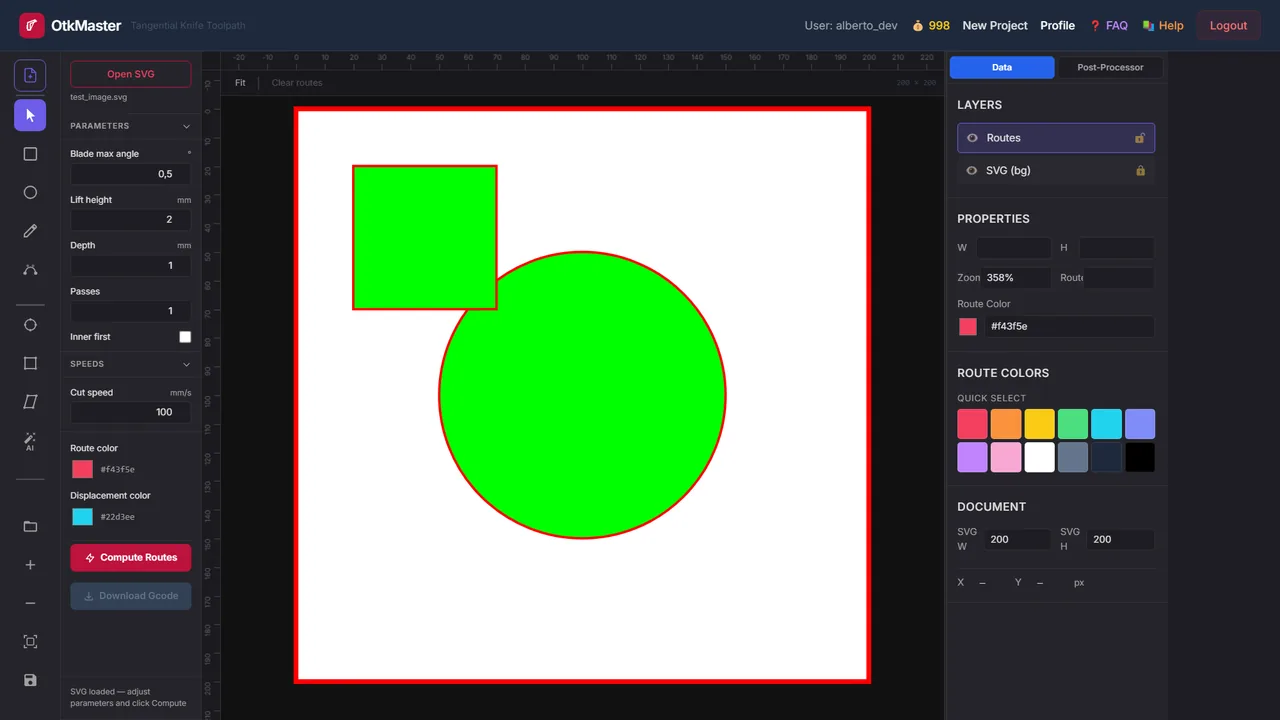
OtkMaster is a tangential-knife CAM tool: it reads SVG contours and computes optimised cut routes for vinyl, foam, leather and other sheet materials, controlling blade max angle, lift height, depth, number of passes, inner-first ordering and cut speed. Routes and displacements are drawn over the drawing and exported as PLT/HPGL or as G-code through editable post-processor templates.
| Group | CAM |
|---|---|
| Status | Available |
| Input | SVG |
| Output | PLT / HPGL, G-code (templates) |
| Max upload | 300 MB per file |
| Runs in | Desktop browser with WebGL 2 (Chrome, Edge, Firefox) — computation on Ahaborg's C++ backend |
| Billing | Pay-per-use credits, no subscription |
| Documented in | i3D Workbench User & Reference Manual v2026.10 |
Overview
Open an SVG file, adjust cutting parameters and click Compute Routes. The server returns a PLT toolpath which is overlaid on the SVG canvas. Toolpaths can be visualized by layer (routes in red, displacements in cyan) with eye toggles, and exported through the post-processor templates.
Step by step
- Open OtkMaster and click Open SVG (Ctrl+O). The contours appear on the canvas; pan with left-drag on empty space, zoom with the wheel.
- Set Parameters: blade max angle, lift height, depth, passes, inner-first.
- Set Speeds (cut speed) and check the Output Format templates for your controller.
- Click Compute Routes. The routes and displacements are drawn over the SVG; toggle them in Layers.
- Click a contour to read its dimensions in Properties; verify the drawing size against the sheet.
- Click Download Gcode (uses the post-processor templates) and check the file in NC Viewer.
Controls
Canvas navigation
- Left drag (on empty area) — pan
- Scroll wheel — zoom
- Click on a contour — select it (shows bounding box, dimensions in Properties)
- Middle drag — pan (alternative)
- Ctrl+N — New / reset document · Ctrl+O — Open SVG
Parameters group
| Control | Range / values | Default | What it does |
|---|---|---|---|
| Blade max angle (°) | — | 0.5 | Maximum allowed rotation of the tangential blade per move. Smaller values = smoother curves but more lift operations. |
| Lift height (mm) | — | 2 | Height the blade rises when repositioning between cuts. |
| Depth (mm) | — | 1 | Cutting depth into the material. |
| Passes | — | 1 | Number of times each contour is cut. Increase for thicker materials. |
| Inner first | — | off | When checked, inner contours (holes) are cut before outer contours. Prevents material shifting. |
Speeds group
| Control | Range / values | Default | What it does |
|---|---|---|---|
| Cut speed (mm/s) | — | 100 | Blade travel speed during cutting. |
Output Format group
Templates that convert PLT commands to machine G-code. Use %.2f placeholders for coordinates.
| Control | Range / values | Default | What it does |
|---|---|---|---|
| Move | — | G0 X%.2fY%.2fZ%.2f | Rapid move (pen up). |
| PenUp | — | G0 Z%.2f | Lift blade. |
| PenDown | — | G1 %.2f%.2f | Lower blade. |
| Cut | — | G1%.2f | Cutting move. |
Layers panel (right side)
- SVG layer — toggle visibility of the original imported SVG
- Routes layer — toggle cut-path lines (Route colour)
- Displacements layer — toggle lift/repositioning moves (Displacement colour)
- Colour pickers — change route and displacement line colours
Properties panel (right side)
Shows dimensions (W × H in SVG units) of the selected contour. Zoom level is displayed and editable.
Actions
| Control | Range / values | Default | What it does |
|---|---|---|---|
| Compute Routes | — | — | Sends the SVG and parameters to the server and overlays the returned PLT toolpath. The Toolpath Debug panel (right) shows the request sent and the raw PLT. |
| Download Gcode | — | — | Writes the toolpath using the Output Format / post-processor templates. Enabled after Compute Routes. |
| Fit / Clear routes | — | — | Fit the drawing to the canvas; remove the computed routes overlay. |
Tips & tricks — OtkMaster
- Clean the SVG first: convert text and strokes to paths, remove hidden objects and duplicate contours — every path in the file is cut.
- Blade max angle 15–25° suits vinyl and paper; go up to 35–45° on foam or leather where the blade can twist in the cut.
- Use Passes rather than full Depth on thick material: two passes at half depth keep the blade aligned and the edges clean.
- Turn Inner first on whenever a shape has holes; cutting the outer contour first releases the piece and the holes drift.
- Hide the Displacements layer to judge the cut order, then show it to spot unnecessarily long rapid moves — reordering objects in the SVG fixes most of them.
- All parameter groups are collapsible — click the group header to expand/collapse and save space.
Troubleshooting
Compute Routes is disabled.
No SVG is loaded, or the file contained no path contours.
Dimensions in Properties do not match the real size.
The SVG has no physical units or a non-1:1 viewBox. Re-export it from your editor in mm.
Works well with
Tools that chain with OtkMaster — see the workflows.